

Before You go complete this detailed Tips and Tricks I can guarantee that you can run a Marathon, Believe me, guys, that is how much content I put into this blog.
I think this is one of my longest blog posts. I Poured all my knowledge and resources into this blog.
If you're able to follow me till the end, I can guarantee, you will take some of the most important tips & tricks on Blogging.
I'm not gonna ask you to wake up early in the morning and drag you to the bathroom and ask you to get fresh-up and have some coffee get boosted and ask you to blog.
If you're here to find out tips and tricks for you're blog, I can say you're really interested in blogging and want to boost your skills.
If so, I can bet you came to the right place.
So let's get into the Business.
I've gathered, analyses, and used these Tips and Tricks on me before I can publish this article. So you can count on me.
First let's understand the structure I've developed, and using this format for a while, which seems very help full.
Are you familiar with these Steps? If yes, mean I can bet you have gone through my previous blog, Starting a Blog. If not please check out my other blog "Starting a Blog" where you can find a detailed explanation about how to start a blog.
In these 10 steps, I've created tips & tricks that are in detail.
Step 1: Pick a Niche

Picking a Topic is the Crucial step in all the steps that you're going through right now, in this article. So let's focus on this first.
1. Get to know you're self-first
You're the one, who is going to be with the blog right from day one. So you should know you're self first.
Just for the sake of money you want to blog means you may not be happy enough about it after some time.
- What is that you're passionate about?
- Are you willing to spend sleepless nights on it?
- What drives your weekends?
.
2. Know you're strengths and weakness
What are you're strengths and weakness? This question both of you're personal and professional life.
If you're happy with your personal life and not with professional life, then consider changing a few things. Vice versa.
I'm not lecturing. Are you willing to spend day and night on this blog? if necessary? then choose that topic that you like the most.
3. Niche it Down
Niche is nothing but choosing a particular field and selecting a particular segment form that.
Example: If you want to write a blog about Animals? Then which Animal? If Dog? Then which Breed?
If you're thinking like niche will not get more traffic and more audience over the internet. You are 100% wrong. Niche blogs are the most success full blogs out there.
4. Get to Know your Target Audience
First, you should know who is your audience, this is similar and dependent on the previous point. "Niche"
If you're able to define Niche properly this will be easy.
Did you ever hear "Behavioral Science" if not it deals with Social, cultural, psychological, economic, emotional, and political sciences? these are those that determine you're Audience.
You have to very care full, with you're content, if you lose anyone's target audience it is like losing your one-month revenue.
5. Have a To-Do list
Always keep a physical notebook in you're pocket. Plan one week ahead for everything. It may be in your personal life or professional life.
This also helps with things that are more important. You'll understand the importance of "prioritization" and get motivation.
You can also use google calendar as a To-do list. This is free, you should have a Gmail account. This will help to organize things easily.
6. Get Inspired by other bloggers on social media
Do you know social media is the best way to get inspired online? This is the place where you're not restricted.
Do you know, There are millions of bloggers who are stars on social media.
Join private and public groups of you're interest and are active in the group.
Ask for suggestions and comment on things that you like.
7. Take suggestions from your audience
If you ask any blogger, they would probably suggest, to take suggestions from the audience. Yes, it is true, and these methods work in real life.
This way you will be able to build stronger relationships with your audience.
Why is this good? and Why is it not?
8. Are you confident about the topic
The next question is "Are you Confident about the topic" Just for the sake of release, do not post an article that is irrelevant.
For example, you're writing an article about a place that you visited. But you might not have tried food in that area.
9. Are you willing to give up $10,000 for this blog?
If I ask you this question what is your response?
If I place $10000 on the table and you're blog, which one do you choose?
If $10,000 then you won't fit in this path.
If you choose a blog rather then $10,000, then congratulations. You made the smart decision.
I'll tell you the reason, why should you choose a blog.
Yes! it will take time to be successful in blogging if you're able to master this field you can make three or more times of this amount in just a month.
10. Don't change your mind
A new blogger's mindset is very sensitive to new and different topics. Be careful about this, because, if you try too many things in blogging you'll fail.
Please choose a topic to perfect. Get the most out of it, and if you find nothing new about it, then try new things.
I wouldn't suggest you put all you're eggs in one basket. But initially, this is the best option.

Step 2: Choose a Blogging Platform

You may think why should I check all blogging platforms. There are 100 more like this in the market place. But these are the most popular blogging platforms.
Each has its pros and cons. But as a blogger, I would like to recommend Blogger or WordPress for a beginner.
Here is the list of Content management Sites
- Blogger
- WordPress.org
- Wix
- Squarespace
- Medium
- Tumblr
- SITE123 & More
There are many out there, but these are the most used platforms.
1. Choose the correct and best platform
One might work for me and the other work for you.
- Blogger is the best choice for protection, as it is powered by Google
- WordPress is good for customization.
- Wix is a better choice if you want to use your website as a blog.
- Squarespace has the best themes on the internet.
- Medium has focused groups.
- Tumbler is good for sharing short stories, and
- SITE123 is easy to build and use.
Each has its Pros and cons. Many are paid platforms. But Blogger and WordPress are free platforms.
So choose the correct and best platform, that you like personally.
2. Which one is better "Comparison"
Compare all the blogging platforms. These are also called content management sites. There are free and paid platforms out there.
There are also customizable options. Some are highly customizable and some aren't. each blogging platform has its pros and cons. be wise when choosing the right platform.
3. Ask other bloggers
This is a preferred choice if you cont made up your mind. Ask other bloggers. Write a personal email telling them what you want to do and ask for a suggestion.
Check their Blogs and use the inspect tool in you're browser.
The majority would suggest WordPress or Blogger or Wix or Squarespace. The first two are free and the next 2 are paid. Choose them wisely.
4. Check track record
There are some with a good reputation and some aren't. Do basic research about their past. Are there any black spots in their services.
Check whether they were hacked or not.
Know their customer services and customization options both pricing and product.
5. Is it user friendly? (Bother author and the audience)
Every Blogger may not have a coding background. Likewise, you and I may have come from different backgrounds.
You should understand UI and UX "User Interface" & "User Friendly".
Check both the writer and the reader are comfortable while reading. Some might be good and some may not.
If it takes more loading time then the user might shift to other blogs.
6. Learning Curve
This is especially for those who are new to the blogging field. The learning curve is one that should be checked.
For example, WordPress has a steep learning curve and Blogger is very easy.
Blogger is like using Word. WordPress needs little coding knowledge, which is optional.
Other platforms like Squarespace and Wix and Medium and Tumblr do not require coding.
7. Check for Customization
Are you're site customizable or not. In this case, WordPress will be on the top. It is open-source and highly customizable.
Blogger is not highly customizable. Based on the theme you can customize it. But it has limitations.
Basic customization features include Social Plugins, Analytics Plugins, SEO tools, and Security Plugins.
8. Check for Updates and changes
How often do these sites get updated? Most probably 2 times in a year? or 1 time a year. Some don't.
But some paid platforms get updated very often.
Blogger gets minimal updates. "Maybe Google has little profit out of blogger"
Updates are very important, to keep up with the trend.
9. Free vs Paid
If you choose Paid platforms like Squarespace and Wix or in that case any paid blogging platform, you should question your self is it worth it?
What is the ROI"Return On Investment"?
If your expenses exceed your income, then consider changing to other cheaper or free platforms.
10. Stick to it
If you like Blogger or WordPress, stick to it at all costs. Because these are the best in the industry. I know Blogger is a bit difficult to modernize.
But if you use it, then you'll know all in's and out's about it.
Just for the sake of someone do not change you're mind and go to other platforms. All are similar. But slight changes.
Now You have selected the blogging platform rite? Then move on to Domain selection part.

Step 3: Find a Domain name

How to choose a Domain name for your blog. this is the first question that came to my mind when I thought about starting a blog.
I think you have the same question rite. If so follow me till the end, you can find a perfect blog name.
"Naming a Blog is like naming you're Baby" so be careful.
Finding a Domain name
Do you ever have doubts about what is a domain?
It means,
"You can’t have a website without a domain name. Like a street address that tells people where you live, a domain helps customers drive directly to your website. - GoDaddy"
It has two parts one is its name and the other is the extension.
This is like your full name.
For example, You're the first name and you're maiden name.
Take my blog: bloggingformulae.com. "Bloggingformulae" is like my first name and ".com" is like my maiden name.
Now, did you understand rite, let's move on.
1. What is the first word/Name that get to you're mind apart from you're name
Frankly, I've no idea why did I choose this point.
But ill tell you why?
It is a proven fact that, if you buy a new pen 98% of people write their name first, followed by the word that they like the most.
In my case, I use to write "formulae" all the time. I kind' a like it. "but I hate Math"
2. Do the research and collect at least 5 to 10 domains that you like
Take me as an example, first when I choose to start a blog 'again' i choose some other domain and started blogging in that, but I wasn't happy.
so I quit that.
Again I choose this blog. 'bloggingformulae.com'. and started fresh. Now I'm good and happy about it.
First I found out all the possible and available names I could find for this blog. and then I choose the one that I like the most.
3. Don't do this
Avoid Alphanumerical combined. For example: www. Mysite123.com, or www.123Mysite.com.
Avoid "-" "Hyphens". this is also another bad idea to consider. For example: www.ABC-EDF.com, or www.123-abc.com.
Choose Short names. For example, www.abcdefghijklmnopqrstuvwxyz.com Does this look good to you.
Avoid "Copyrights" issues. This is a very serious business. For example: us.gov/food&drug, and if you use www.us.food&drug.com.
Choose ".com". Most of the cases you're Blog is not restricted to a particular location or region. It is watched and followed by people all around the world.
4. Get a Perfect Domain Name
So now you know what should and what shouldn't be your domain names.
let's find out what should be our domain name.
The perfect name is like "you're name"
It is the name of you're blog.
It is the name of you're First Online Business
So be careful. Just for the sake of cheaper deal or for the sake of someone else suggestion don't go against you're will.
5. Ask a random person about the Name
Ask the name that you selected a random person. and tell them you're intention. This way you'll get the most honest and truthful response.
Next ask the same question, in the niche that you want to blog about. Take their suggestions. and compare them will all others.
6. Use your domain name as an email extension
This is the next step, many will fail to follow. Don't be careless about this topic.
You should always choose your blog name ie. domain name as email extension.
Just like I did. As you know my blog name is bloggingformulae.com.
So does my email address. punith@bloggingformulae.com.
7. Use your domain as for all social media accounts
This another thing that is very important. You should name all the social media accounts.
You may use it or not. it doesn't matter. Do name all the possible social media accounts as you're domain name.
These platforms are very important for gaining social engagement with social sites.
These social platforms also drive traffic and sales to the blog.
8. Check all domain providers for a better deal
If you find a domain name for a good price take it.
If you feel the pricing is high then open all the domain name providers in one browser.
Then type in the blog name that you selected previously. Then adjust the time period.
Some providers provide discounts and additional deals, for a longer time.
9. Remember the renewal date
There where cases, where big companies and blogger lost their domain, just for sake of not doing proper renewal.
Mark a date in the calendar and renewal Both Domain and the Email without fail.
Most of the Domain providers have Auto-renewal option, that also works. but be advised.
10. Are you happy with it?
Now comes the final question, "Are you happy with it?"
Ask this question to your self before making payment.
If you're not then take a break, clean up your mind and take a blank paper write it down. why don't you like it?
So you can have a better picture of what is going wrong.
If you're happy then, you're good to go.
Step 4: Find web Hosting

Finding a Hosting for your website is like finding a Home for your site. Having a small house with all the resources is better than having a villa without resources.
The Best or Worst, every Hosting boils down to 3S's, "Speed", "Support", & "Security".
If Hosting service providers miss any of the "S" then they are not the best choice to choose from.
An interesting fact about bloggers is you have no worries about this, as Google takes care of it.
1. Find the best
Finding the Best is nothing but, choosing the top hosting company, It depends on a few questions like,
- What kind of website do you plan to host online, is it a blog, news site, or others.
- How much web traffic you expect and how robust the infrastructure you are looking for.
- What are the goals of your website?
2. Ask why they are better
This is one of the many things that many Bloggers ignore. Simply drafting an email, or calling the customer service, and asking them why they are better?
With this simple question, you can evaluate their, Services, and this also helps you in finding a better deal.
3. Tell them their competitor deal
Show them their competitor deal that you made and ask them to offer a better deal.
I know this will take some time, but this simple step can save you a tone of money later.
They may not decrease the price, but they can offer other services and special benefits.
4. Ask for a better deal
Most of the cease the price for hosting is fixed. But there is a catch. If you go from the sponsored website or from other sources, there is a chance of finding a better deal.
First, tell them if you previously used their services, and if you have any bad experience tell them why. and then ask for a better deal.
5. Check the load time
According to Google if you're Blog takes more than 3 seconds or more then the user or the reader is most likely to shift to other sites.
If your site takes more time to load, it may be your friend or best customer, they would simply shift to other sites.
6. Check the previous track record
Checking previous track records means, knowing the history. How many years they are in this industry? who are their biggest clients? what is their back up plans for the crash?
If the hosting company has less than 1-minute downtime, the previous year then they are a good choice.
Recently many are asking their power source. Is it a renewal or not.
7. Number of data centers and their locations
On average a good Hosting company has data centers in 7 locations. This may vary from company to company but, this is very important, for you're Site load time.
If there are fewer than 3 data centers, then load time takes more time for you're a customer. which is not good at all.
Make sure you choose hosting to have at least 5 to 6 data centers.
8. Hacked previously?
From my point of view, this is a very serious point to be considered. This simple step determines you're privacy and you're customers' privacy. So be care full.
I know it is very hard to hack into the serves and data centers. It doesn't mean you can take this matter lite.
If you're site been hacked means, your life is in danger. So try to protect your site from all points.
9. SSL Certification options
SSL certificate is very important for all of the sites, it may be a Blog or a Website. Without an SSL certificate, your blog is not secure and won't be trusted.
Few Hosting companies provide a Free SSL certificate with free installation.
10. check for Renewal Plans
Generally, the services providers like Hosting sites and domain provides do send an advance email regarding the Renewal.
However, there are cases where many bloggers miss the payment and they lose access to their Blog.
If these situations occur from the Audience's view, then you're going to lose many more audiences.
Step 5: Choose a Theme and Plugins

It is a well-known fact that if you want your blog to succeed you need a good theme. Even though there are tones of Blogging platforms out there WordPress and Blogger are the most used.
Even though if you choose premium services from a premium blogging platform, if you choose the wrong and clunky theme, all you're time and money you spent is worth nothing.
Choosing a Theme for you're Blog is like choosing a Weeding Dress. and Choosing Plugins is like choosing a Ring. "So be Super Cautious".
1. Know you're taste
Guys I'm not talking about food! 🥘😋.
I'm talking about you're personal taste on website color and design.
The best way to find is, check all the top websites, and check websites and Blogs of the niche that you want to work on.
Take a blank paper and a Pencil, draw a simpler version that you want for you're blog look like.
2. Choose Lightweight themes
Did you ever seen, that HD Image takes more time to load then Compressed Images.
Like that heavy themes will take more time to load, which is not advisable.
If you're Audience spread all around the world, the internet speed is different from region to region.
3. Use Mobile-Friendly themes
You know according to google there are 60 to 70% of users use Mobile for searching content online.
Having a good looking theme shouldn't be your first priority, making sure you're site is mobile friendly is important.
There are themes for all, some are good for Computer and some are good for Mobile phones.
4. User Experience (UX) is important
UX is the common word used in theme design. This means the User front. User Experience is very important, for you.
Because, if you have great content that is not at all available on the internet, with bad UX, then everything you worked for is worthless.
5. Check for Color combination
Bright colors may look good. But this is not advisable for anyone. Because if you look at the bright color for a long time it may affect your eyes.
You should take care of you're readers' eyes too.
There are many cases where the bloggers choose a Bright theme first, and then after some time, they are asked to change to lighter color themes.
6. Do Quality test you're self
Many times bloggers hire a QA test engineer for testing their site. This is a real mistake, that they make.
Do quality test you're self. It is very simple.
If you're using Chrome, try the same in "incognito mode", test on Different browsers, like Firefox, Edge, and also test on all the search engines that are available.
Then test on a Mobile phone.
7. Use Proven Plugins
You know there are 50,000+ plugins out there in the market place. But a hand full of them are the most important and most used tools.
There are Free and Paid Plugins out there. Most are free, for trial, and for a certain limit. But paid versions are also available.
Always use proven and secure plugins. Just they are available for free you can not use them.
8. Social and security are the keys
Social media, Contact form, email subscription are the most common plugins that are used most of the time.
After Social plugins "Security" is important.
I'm insisting you more on security, because, if hackers find a loophole, they can lock you out, from your site and ask for ransom.
9. Don't use unnecessary plugins
Free plugins and other unsecured installation, most likely will steal your information. Just they are available free means you shouldn't try them.
If you install one Flaw plugin, you can lose all the information that you had.
If you use unnecessary plugins load time and security are at risk. My advice always uses proven plugins.
10. Unproved plugins are the way in to hack your blog
Generally, you shouldn't install more than 15 plugins. Many other bloggers may tell this is wrong.
But I stand with this point. Because if you use more of unnecessary plugins load time will be affected.
If you install free and unsecured plugins then you're self letting in the Hackers into you're site. So be care full while installing plugins.
Step 6: Keyword research and SEO
Keywords are the key pillars for the success or the failure of the Blog. Do Through Keyword research.
1. Keyword research
Keyword research looks like a simple thing. But it is not. Finding perfect keywords is as difficult as finding a perfect niche.
There are well-established players in the blogging world, where they primarily rank high on google search, due to Keywords.
The Goal of any blogger is to rank themselves high on google search with the best keyword.
If you find any keyword that has good search history "organically" to you're blog, you will rank on the top.
2. SEO Friendly
SEO friendly article doesn't mean to include all the keywords that find on google in your article.
SEO-friendly content is the type of content that’s created in a way that helps the search engines rank it high.
Any SEO friendly article should have these,
1. Use headlines and sub-headers
2. Add links to previous content
3. Optimize your images
4. Choose your keywords wisely
5. Write high-quality content
6. Optimize the length of your article
3. Use easy to remember words in headings
Actually, this blog is based on this principle "Using easy to remember words in headings".
I mean to say if you search anything on google, you would search "What", "where", "Who", "Why", "How" & "top", "1 to 10" Numbered. questions.
So always use easy to remember keywords, or start with the above words.
4. Include all the relevant keywords in the article
If I'm Nell Patel or Brian Dean I wouldn't take up this point. They are the masters of Keywords and SEO friendly articles.
But, I would recommend following this point, because, if you're able to include all the relevant keywords in one place and answer them then the reader can find more value then they are searching for.
This way they will come back to your site again and again since you cleared them all the doubts that they had.
5. Understand where to place the right keyword
This is a simple point that may blogger neglect. I know, even I did that mistakes previously.
Like adding keywords at the end of the article, or in the middle of the article.
This kind of step is worthless.
For example, you find a keyword, with worthy content, you should name that article with that keyword.
6. Search Intent & Volume
To do keyword research effectively, you must find keywords that your audience is searching for in you're blog.
If you include a relevant keyword, it drives traffic t you're blog and your're audience will find trusted content in the best way possible.
So you'll rank on high and search terms will highlight you the most.
Search volume refers to the number of times users searched the keyword in a week or in a month.
Ideally, you want to target keywords with high search volume for your blog. How ever there is a catch, most searched keywords are ranked means you are less likely to rank high.
If people searching for that word again and looking in your article means your blog is likely to rank high.
7. Keyword Difficulty
Keyword difficulty means, the degree of competition for that word, or degree of competition you must face in getting your blog to rank for a keyword.
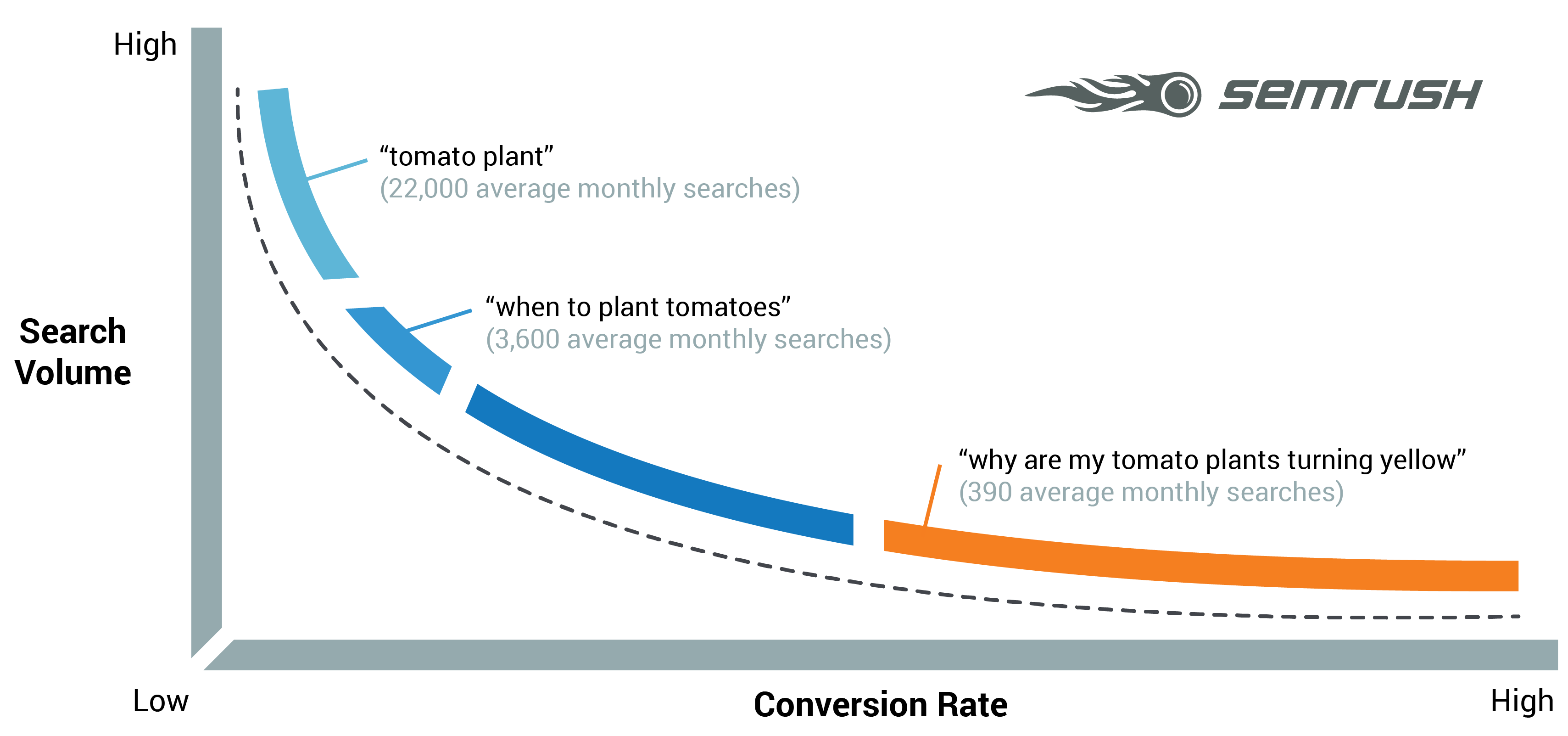
link: Semrush
Simply including the keyword is not important, finding relevant and long and worthy keyword is important.
In this example, I include only "tomato plant" it is unlikely that you'll rank high, but in you write an article n "why are my tomato plants truing yellow" you'll have edge over others.
8. Understand what is proper anchor text
There are two types of anchor texts out there, one is for links and the other for images.
Inserting proper anchor text for proper links is more likely to get more visitors to your article and to you're website.
Both image and link anchor text is important and should be named properly.
These anchor texts are important.
9. Track the keyword trend on google trends and on other tools
Google trends are one of the best ways to find a trend online. It is free. There is a tone of tools that are available out there, but this is one of the most used tools by many bloggers.

In this image, you can see the trends of "iPhone over time.
10. Note down/store all the keywords that you ever used
This is one of the easiest steps. Simply you can download these keywords to excel or word file with all most all the tools that are available out there.
By having all these keywords in separate folders you will have edge over other bloggers.
Step 7: Write your First post
1. Write a Catchy headline
Catchy Headlines are the key to the success or the failure of the blog.
Do research on google and find the best and catchy headline. The best way is sneaking into your competitor or well-established blogger.
This process not only helps you in understanding where you're but also helps in understanding what you're racing against.
Spend a little bit of time perfecting the headline rather than perfecting the rest of the blog.
2. Write in your own words
This is one particular point that I love the most.
Write in your own words. Because, if you use your own words while writing, you're more likely to write more and perfect sentences.
If you sound like a robot then no one would like to read your article.
Tell me one thing, do you like to read a blog that would likes machine or an article that is small but sounds like a human?
So always write anything in your words.
3. Try to create/shoot your own images for an article or use royalty-free images
Articles with images are more likely to get more traffic than that of articles without images.
Always use free images or use royalty/license-free images.
One image is equal to 1000 words. Do try to include relevant images in the article.
This will grab the attention of the readers.
4. Step by step explanation
66%+ of online readers are more likely to read Step by Step explanation than bulk text.
Step by step explanation is the best way to understand anything.
This helps in the easy track of the sentence and the process.
So try to explain in step by step process or in Numbering formate. This also helps in bookmarking particular steps.
5. Understand the importance of Back-links
Backlinks are the 2020's trend. Backlinks help in building a reputable image on the internet.
With relevant backlinks not only you're competitor but also others more likely to include your article in their blog.
With multiple backlinks, your article will have a better score and can rank high.
6. Highlight links properly and checks for broken links
If you're familiar with Backlinks you'll know the importance of highlighting the links.
Highlighting links, not only to you're article but also to other relevant sites will help you in ranking higher in the google search results.
Check for broken links. If you have broken links, and the reader wants to find out more about that, then it won't look good. and the score you made previously on the google will lose.
So always highlight links with other colors, for easy identification.
7. Copy and Past do not work
If you're thinking about CTRL+C and CTRL+V, I mean "Copy and Past", is the stupidest thought you ever had.
Google is much smarter than ever before.
This tactic might have worked in the 2000s, but now this won't work at all.
Google can identify what you copied. If you do this your article doesn't come up in the research results and you'll lose your spot on the google search page.
8. Understand the importance of Table of contents, Introduction, and Conclusion
Any article should have a Table of contents, introduction, and conclusion.
First of all, let's talk about the Table of contents. It helps the reader with easy navigation.
Secondly, Introduction. The introduction helps the reader to know what he/she looking for.
The conclusion helps in concluding the article. If the reader misses anything in the middle of the article, they can get it from the conclusion.
According to "Neill Patel"" research 60 to 75% of readers first read the conclusion and then they will read the full article.
9. Do not use long and complicated words
If you're from the US or if you ever listen to US President speech you'll get to know how they speak. Mr.Obama and Mr.Trump use 8 and 7th-grade language and phrases.
So always use simple words.
Long and complicated words maybe look good from your point of you. But the reader may not understand anything.
10. Case study type
Case Studies are the most popular and the best way to attract more "Quality" readers. I mean the intended audience is more likely to come back if you include all the details in the article.
Case Study type blogs are more likely to be success full than general blogs.
Including all the relevant 100% relevant content and with all the detailed articles will be more success full.
Step 8: Publish and Promote
Here comes the marketing and selling part. In everyone's life, you and I need to sell something.
1. Publish valuable content 2 times a week
There is no alternative for valuable content. If you're able to release 1 or 2 valuable content every week then you can chill.
If you plan to release every week two articles continuously, for 3 to 6 months then this will become a habit, and your readers will expect something from you.
2. Ask and Respond to each and every comment
By simply adding a call to action, you will have 2 advantages. One is your readers are more likely will become buyers, and you can have their email and name to send the email later.
For every article ask your readers to comment below and you as a writer need to respond to each and every comment.
3. Use all the social media platforms
For Starters Social media is the only and best platform out there. You should utilize all the available social media platforms, at any cost.
you don't need to have any special knowledge to operate any social media, it may be Facebook, Pinterest, Twitter, Reddit, Tumblr, or Instagram.
4. Give reasonable answer on Quora
Quora is the Q&A platform, where you can drive more traffic to you're blog.
Quora emerged as the best alternative to Wikipedia, for finding answers.
Don't try to sell, provide valuable and consistent information, and eventually, readers will come to your blog.
5. Paid ads are not suggestible
For Beginners like you, I wouldn't suggest going to paid ads. This comes at a hefty price tag, and the results are little to non.
If you calculate ROI (Return on Investment) it is very less for bloggers.
6. Pinterest and Quora are the best
Previously I talked about "Quora", and I've explained why it is more important than paid ads for bloggers.
Now let's talk about Pinterest.
For Fashion, Decor, and lifestyle bloggers Pinterest is the only source of traffic.
7. Create a Slideshare
Did you ever use Slideshare? If not check it out. It is linked to the product part of Microsoft.
It is also a free platform where you can share valuable content on slides.
I know you have to have a focused niche to go through this. But If you own and operate a tech blog, then try Slideshare.
8. Add reviews on other blogs
Adding reviews and commenting on other bloggers, will help you in two ways, one is you get to know you're a competitor and you can tap into their audience base.
This way you can create a better relationship with you're competitor, and they can share valuable information with you.
9. Create Private groups on Facebook
Private groups are like communities inside the community. You don't understand rite.
For example, you are a blogger who is blogging about, Food and Recipies, particularly there would be a community, rite? Like that, if you have a private group, you can have a dedicated group of followers where you can share your thoughts about your next blog and tell ask for the feedback.
10. Ask your Audience/Readers to share the article
It is one of the simple ways to reach more audience, is asking you're existing audience to share the content to others.
I know most of them to don't, but if you do simple math you can know how important it is.
If 1 out of 10 readers share with others, it may be on an email or social media, if you have 10K readers then you'll have 1000 new audience rite.
Step 9: Build an Audience base
1. Understand you're audience reactions from day one.
If you're able to identify proper a Niche that you want to blog about, then you're half a way through.
Right from day one understand audience reaction. I know, it might take 3 or more months to build a considerable audience.
But if you act like a seller, you're audience won't believe you. So act like a friend.
2. Build Email List
Building an Email list is a very important task of all the tasks in promoting. Because every reader might be lost, they might forget you.
If you have their email you can email the latest topic to them directly. In that way, you can gain trust.
Again "Reminder: Don't act like a seller."
3. Include contact form
Including Contact form in every blog is as important as including the comments section.
For example, if I'm a customer and found your article on the web and I like it. If I want to approach you what is the medium.
4. Send weekly email alters about the New article
Previously in the 2nd step, I've talked about collecting Emails. right?
If you release an article, you might want to share directly with your audience, right? Newsletter, or also call email alerts about the news article.
5. Praise you're Audience for their suggestions in the blog post
Praising you're Audience for suggestions in the blog is very important. The reason is, you can build "not a reader, but a Follower".
If you include any reader's names, in the blog, they are most likely to stay with you all the time.
6. Send an email to other bloggers about new things
Sending emails to other bloggers/"Competitors for Business", will help you in understanding what you really are.
For example, your blog about technology, and you found something interesting, that you want to share it with another blogger, who is in the same field.
7. Run Audience Polls
Facebook, Instagram, Twitter, or any other social media platform has Audience polls. Many ignore it.
If you're confused about your next article, then simply create an audience poll and you'll get valuable insights about what your audience really wants.
8. Join relevant Groups
Joining Niche/Relevant groups is very important. Because the world is not limited to you're blog.
There are pro, bloggers who are in the industry for more than you're. They share information regularly on the groups.
The best platform is Reddit. This is the best platform to find the best and efficient groups.
9. Ask for honest feedback
You and I love our Blogs. You and I can not find any Flaws in our blogs. But others can.
Simply asking for feedback about the blog, you can know where are you making mistakes. and where are you good at.
10. Every Day is a New Day
Every day is a new day. Believe me guys, you should feel every day is like your first day blogging.
I mean to say, you might have a bad day or good day, this shouldn't affect you tomorrow. right.
Step 10: Make Money Blogging
Blogging is not new to this world. It has been since the 1990s. Till 2007 it was seen as a personal blog, and monetization wasn't a thing then.
Fast forward in 2020, some bloggers make more than a Million Dollars. It all depends on Patience and Dedication.
Monetization is not easy, it might take A Month or a Year. There is no shortcut to making money "Fast".
If you want to make money Fast you're not in the right place. I'm not going to tell you how to make $1000 in Month.
1. Monetization is your priority?
Before thinking about Making Money with Blogging, ask these question to you're self.
- Why do I want to make money?
- Is Blogging the right way to make money?
- Does My audience really get what they want?
- Am I delivering to my fullest efficiency?
2. Banner ads
The banner is one of the simplest ways to make money. you simply have to go to Google AdSense account and sign up. Follow the steps, and you're done.
If you have consistent traffic and, if any of the readers click on the banner you get paid. The price per click may vary from place to place and product to product.
3. Affiliate marketing
Affiliate marketing is the best way to make good money on Blogs. In 2020 Affiliate is the go-to place for many bloggers to make money.
But you need to provide valuable content to you're the audience, and motivate them in such a way that they will but that product or the service.
Most of the bloggers start with Amazon Affiliate program.
4. Paid Sponsored Post
Paid Sponsored Post is not a new thing. It is there for a long time.
Paid Sponsored post means, you as a writer of a community/Niche will be hired by some other blogger to write a Sponsored post on their Blog.
For every post you write on other bloggers, you'll be paid based on the agreement.
The sponsor can hire you from freelancing websites or they can directly approach you.
Some well-established writers can charge any were from 80 to 100 Dollars per hour, that is for every word that they wite costs around 50 to 90 Cents.
5. Create co-branding
Co-Branding is another best way, to get paid a good sum of money. If you're a well established Blogger in the field, then you have a higher chance of becoming co-brander for another blogger or a company/product.
Reaching hight in the field of blogging is easy, but it takes time and dedication. Once you're on the top you can do whatever you want.
The best example of co-branding is Dell and Intel.
6. Sell stuff (yours, Others)
Selling Stuff like Online courses, Material, or Products, It may be you'res or others.
This process might take some time in the beginning, but it is the best way when comparing to Affiliate marketing.
7. Create a Book or online course
If you like to write books then you can make another stream of income out of your blog.
Simply you can publish a book on the Amazon for a higher price, and publish the same book on you're website at discount.
Convert your readers to buy your book with additional discounts and offers.
If there is good traction to your blog than they are most likely to but the book. and they can promote for free, in that niche.
8. Diversify
"Don't put all your eggs on one basket" Is one of the famous quotes that we always here when we're studying. rite.
Here is why, If you own a successful blog and you're making money in different ways.
One way is Ads,
The second way, Affiliate marketing
The third way is the Online stores.
9. Note down every penny that you spend and earn
Get rich slowly is the best Article out there which emphasizes tracking every penny that you spend.
We have been looking on the internet, rite, how milliners lose everything overnight, and become homeless.
10. Are you Happy?
Are you happy with the blog that you're working so hard?
If the answer is "YES", then stick to it at any cost. Don't Look at the monetary benefits on other bloggers on other niches.
Now you have 100 Tips & Tricks that I've been using for a long time. These are very important tips that, can take you from 0 to 100.
If you're still here then that's great, for you I've included 23 more Bonus tips and tricks that are not discussed previously. These tips and tricks are specially for those who stick with me this long.
Here are the Bonus Tips and Tricks
1. Set a Predefined goal for the blog
2. Build Call to action list in every blog post.
3. Don't forget your first audience
4. Keep Things Short
5. Build an Email list and another contact list
6. Build a calendar
7. Give Stuff away"Free"
8. Do not change to other topics
9. Measure the traffic
10. Make References to other bloggers
11. check for errors
12. Reuse your blog content
13. Update the old content
14. Show numbers like 99.99 etc
15. Show statistics
16. Back up your content
17. Give Your learning and Knowledge to others
18. Lesser then 1000 word blog post "fails"
19. Mention other success full bloggers
20. Use Free tools
21. Brand you're blog as a premium blogger
22. Mention inspiring reviews on your blog
23. Don't give up.
Now you're equipped with the insane list of blogging tips and tricks that I can guarantee you can achieve heights in this blogging world.
Congratulations Guys, start this evergreen platform of blogging and create a passive income source with you're writing skills.
Conclusion:-
These are the tips and tricks that helped me a lot.
I can take 100 more tips and tricks, but I don't want you to get overwhelmed with the information. So I choose only this that is very helpful.
I know these are a very long list, but this is very important.
So what do you guys think? did you find any of my tips and tricks that made you're life easier? If so please leave a comment in the comments section.
If you have any other tips and tricks that you have share it in the comments section, so I can publish them in the blog for the good of all.
